Your own thoughts. Beautifully at home on iPhone.
Notes as beautiful
as your Socials.
A free note-taking app for iPhone. Beautiful personal notes to keep or share.
Give your Scrolling time somewhere more heavenly to go. NoteSub makes every note look lovely the moment you write it, with no formatting to fuss over. Catch an idea, keep a memory, or just write. A calm place for your own thoughts, and nobody else’s. And share how you want.
- Note types
- 8
- Account
- None
- Made for
- iOS
Made for your life, not your workplace
Your thoughts don’t need a corporate workspace.
Another spare minute. Another scroll through everyone else’s life. Or a little space for your own: a thought worth keeping, a photo with a story, a journal entry just for you. NoteSub is an antidote to the boring notes app—a personal notebook you actually want to open.
Think of it as a consumer-first alternative to the workspace approach of Notion: made for your life, not another system to administer. Your notes look beautiful without styling them yourself. Eight ready-made note types let you write, record, draw or plan without turning a small idea into a project.
Looking for the best note-taking app for iPhone? NoteSub is our pick for this kind of personal space, not a claim that it beats everything at everything. Below, compare its ready-made approach with Apple Notes, Obsidian and Notion, and see what suits the way you want to write.
Eight note types
Every kind of thought already has a shape.
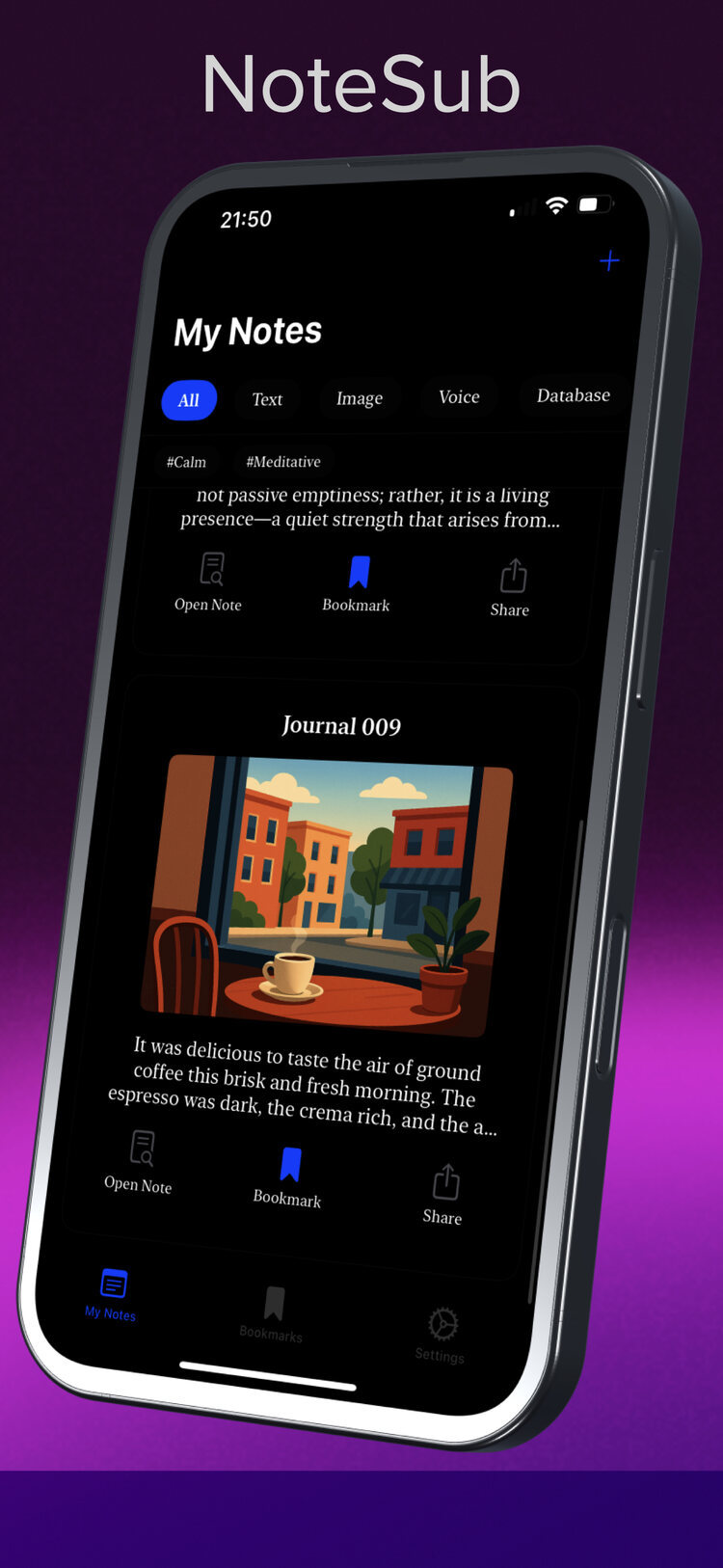
A tiny journal entry. A recipe you want to try. A sketch of something that does not exist yet. Choose a note type and let NoteSub take care of the presentation. Your ideas live together in one list you can filter, tag and bookmark.
- 01
Text
Write long or short with considered typography that makes your own words pleasant to reread.
- 02
Image
Keep a photo with the thought that goes with it, presented as a card rather than an attachment.
- 03
Voice
Record an idea the moment it arrives, when typing would lose it.
- 04
Database
Columns and rows for collections: reading lists, recipes, gear, anything you keep track of.
- 05
Todo
A plain checklist with progress shown at a glance from your notes list.
- 06
Kanban
Columns and cards for projects that move from To Do to In Progress to Done.
- 07
Weekly planner
A ready-made week, Monday to Sunday, so planning starts with a page that already exists.
- 08
Drawing
Sketch a layout, diagram or doodle. On compatible iPads, draw with Apple Pencil.
Private by default. Shared by choice.
Your notes. Your people.
Your choice to share.
No NoteSub account
Nothing to sign up for. Install it and your first note is seconds away.
Local-first and offline
Notes are stored on your device first and work without a connection: on a plane, underground, anywhere.
Share a note, not your whole notebook
Send a PDF to anyone, or a NoteSub file to another NoteSub user. You choose what to share and who receives it.
Optional iCloud sync
If you want notes across iPhone and iPad, iCloud sync is an optional paid in-app purchase. Skip it and nothing changes.
Privacy label
The developer declares Data Not Collected on the App Store listing. That is the publisher’s declaration, not an independent audit.
Notes and weekly planning
Plan the week in the same place you think.
A personal notebook can hold the practical things, too. Plans for Saturday, a reading list, the little jobs you want to remember. In NoteSub the weekly planner, Kanban board and todo list sit beside your journal entries and voice notes. Planning is there when you need it—not the reason every thought has to become a task.
Focus mode
Hide the interface and stay with the sentence.
Tags and tag search
Find every #calm or #project note in one move.
Share a PDF
Choose a note and send a clean copy to anyone.
Share a NoteSub
Send a NoteSub file to another NoteSub user. Your other notes stay yours.
Apple Pencil on iPad
Drawing notes with Pencil on compatible iPads.
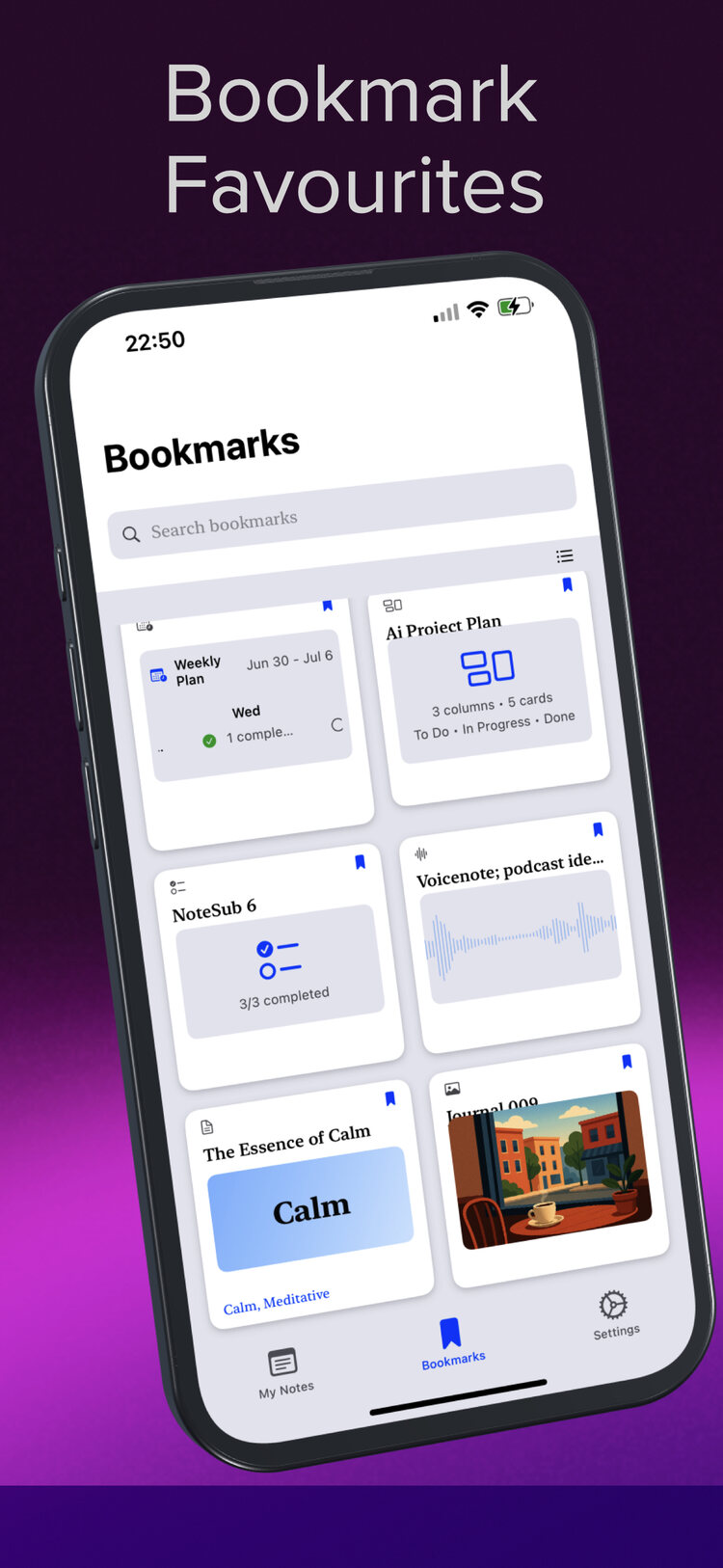
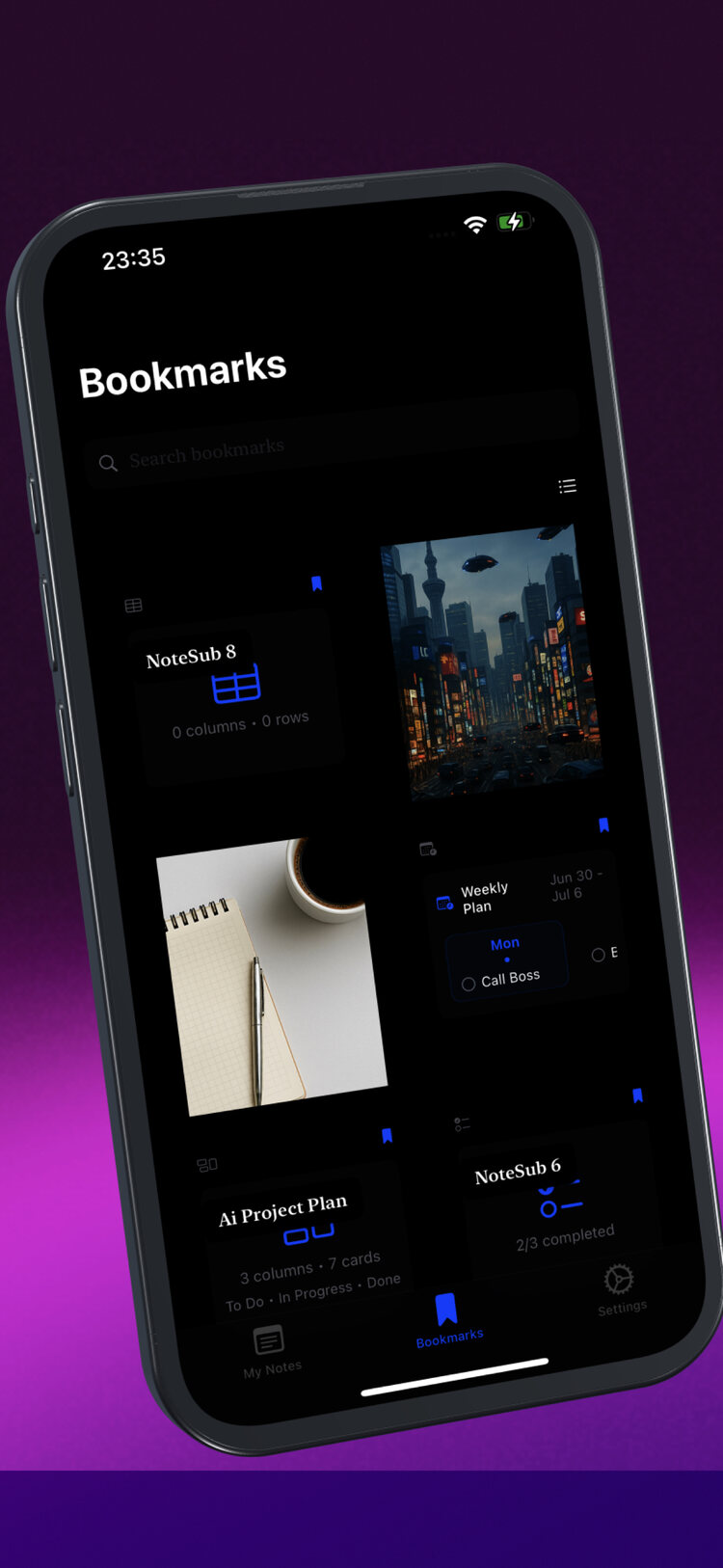
Bookmarks
Keep the notes you return to at the top.
NoteSub vs Apple Notes vs Obsidian vs Notion
Built in, or built by you.
Beautiful personal notes, without first building a system: that is why we recommend NoteSub. Compare it with Apple Notes, Obsidian and Notion below. Built in identifies an included capability; Configurable means setup, templates, plugins or views shape the result. The details explain what is ready-made and what you arrange yourself.
| Feature | NoteSub (our pick) | Apple Notes | Obsidian | Notion |
|---|---|---|---|---|
| Ready-made note types | Built inEight types chosen when you create a note: text, image, voice, database, todo, Kanban, weekly planner, drawing. | Built inRich notes with checklists, tables, attachments, sketches and scanned documents in a single note format. | ConfigurableMarkdown notes as the base; structure comes from links, properties, templates, Canvas, Bases and plugins. | Flexible pagesBuilt-in text, image, to-do and database blocks; combine them yourself or start with a template. |
| Weekly planning | Built inDedicated weekly planner note type. | ManualCan be built from checklists or tables; no dedicated planner note type. Reminders is a separate app. | ConfigurablePossible with templates, daily/periodic notes approaches or plugins. | Templates or setupBuild a plan with pages, tasks and database views, or add a template; free and paid templates exist. |
| Kanban boards | Built inKanban note type with columns and cards. | Not a note typeNo dedicated Kanban note type. | ConfigurableCore Bases offers views including a documented Kanban layout; community plugins also exist. | Built inDatabase board view with cards grouped by status or another property; choose how to organise it. |
| Databases | Built inDatabase note type with columns and rows. | Built inTables inside notes (not a database view). | ConfigurableCore Bases turns note properties into table and card views. | Built inDatabases of pages with properties and table, board, gallery and calendar views. |
| Voice | Built inVoice note type for recording. | Built inRecords audio and can transcribe on supported devices and languages. | Core pluginAudio recorder core plugin. | Audio uploads and embeds. AI Meeting Notes records and transcribes, including on mobile, on Business, Enterprise or eligible AI-inclusive mobile subscriptions. |
| Storage and offline use | Local-first on your device; works offline. Optional iCloud sync is a paid in-app purchase. | Stored on device or in iCloud, tied to your Apple Account; integrates with the Apple ecosystem. | Local Markdown files you own; works offline. Optional paid Obsidian Sync. | Cloud workspace with offline pages in desktop/mobile apps on all plans. Download pages per device; paid plans also auto-download recents and favourites. Some blocks and database rows have limits. |
| Account needed | No NoteSub account. | Uses your Apple device and Apple Account for iCloud features. | No account needed for local notes. | A Notion account and workspace to create and manage your notes. |
| Organisation and search | Tags with tag search, bookmarks and filters by note type. | Folders, tags, smart folders and search. | Folders, tags, links, backlinks, graph view and search. | Pages and subpages, favourites, workspace search and filtered database views. |
| Distraction-free writing | Built inFocus mode. | Clean editor; no named focus mode in Notes itself. | ConfigurableThemes, CSS snippets and plugins can strip the interface back. | Page editor with font, text-size and width choices. A dedicated distraction-free mode on iPhone was not verified in the reviewed documentation. |
| Sharing and export | Export as PDF; share as a NoteSub file to another NoteSub user. | Share and collaborate on notes with other people; export to PDF. | Plain Markdown files are portable by design; export to PDF; Publish is optional and paid. | Shared pages and collaboration; PDF, HTML and Markdown/CSV export. Permissions, workspace settings and some export options vary. |
| Apple Pencil | Drawing with Apple Pencil on compatible iPads. | Deep Apple Pencil support on compatible iPads. | Depends on note type and plugins; Canvas and handwriting setups vary. | Images can be uploaded from another drawing app. Native Apple Pencil drawing was not verified in the reviewed documentation. |
| Best known for | Beautiful personal notes without formatting fuss, with planning ready when you need it. | Zero-setup integration and collaboration across Apple devices. | Linked knowledge, extensibility and plain-file ownership. | Customisable workspaces, databases and team collaboration; also usable for personal notes and planning. |
Scroll the table sideways to see every app.
Why we choose NoteSub
Beautiful notes without formatting fuss. A personal home for ideas, memories and journals, with eight ready-made note types, focus mode and planning when you want it. No NoteSub account to create.
Apple Notes: system integration
Already installed, deeply woven into iOS, with shared notes and audio recording with transcription on supported devices and languages.
Obsidian: a linked toolkit
Plain Markdown files you own, backlinks, graph view, Canvas, core Bases views including Kanban, and a large plugin community.
Notion: a configurable workspace
Pages, database views and collaboration for teams or individuals who want to shape their own system. More workspace flexibility; a different approach from NoteSub’s ready-made personal notes.
Which should you choose?
| If you... | Our suggestion | Why |
|---|---|---|
| You want somewhere personal to write instead of scrolling | NoteSub | Beautiful notes for your own ideas, memories and little discoveries—not another social feed. |
| You want to jot ideas and plan the week in one calm app | NoteSub | Ready-made note types mean the planner, board and checklist already exist. |
| You want notes that look good enough to reread | NoteSub | Card-style presentation and considered type are the point of the app. |
| You want personal notes without configuring a workspace | NoteSub | Choose one of eight ready-made note types and write. Notion offers more configurable pages and databases; NoteSub puts a finished personal notebook first. |
| You want private notes with no new account | NoteSub or Obsidian | Both work locally without an app account; NoteSub needs no setup to get there. |
| You share and co-edit notes with family or colleagues | Apple Notes | Live collaboration and system-wide integration are its home ground. |
| You want transcribed voice memos | Apple Notes | Transcription on supported devices and languages. NoteSub records voice notes but does not claim transcription. |
| You are building a linked knowledge base or second brain | Obsidian | Backlinks, graph, Canvas and plugins reward people who enjoy configuring. |
| You need a shared corporate workspace with custom databases and workflows | Notion | Configurable database views, shared pages and collaboration suit this need. NoteSub is the personal notebook choice, not a replacement for team workflows. |
| You carry an iPhone Duo | NoteSub | Its App Store listing names iPhone Duo support from version 1.17. |
iPhone Duo compatible notes
Two screens. One calm notebook.
Version 1.17 of NoteSub lists iPhone Duo Support on its App Store page, and the publisher describes the app as adapting to the Duo. If you are looking for the best new apps for iPhone Duo, start with a calm place for your own thoughts: beautiful notes, images and sketches instead of another feed to scroll.
We describe NoteSub's support from its own listing. We make no claims about Duo support in other apps; check their listings directly.
Getting to know NoteSub
Your NoteSub questions, answered.
How does NoteSub make my notes beautiful?
NoteSub takes care of the presentation: considered typography, card-style notes and ready-made layouts. Choose a note type and add your words, images or ideas—no building a layout or fussing with formatting before you begin.
What can I keep in NoteSub?
A journal entry, a photo with a story, a voice memo, a recipe collection or a sketch. There are eight note types: text, image, voice, database, todo, Kanban, weekly planner and drawing. Practical plans can live beside the thoughts you simply want to keep.
Can NoteSub be an alternative to social-media scrolling?
Think of it as somewhere else to spend a spare moment: write a thought, save a memory or sketch an idea instead of opening another feed. NoteSub makes your notes beautiful automatically, without fiddling with formatting. It is an invitation to make something your own, not a promise to change your habits for you.
Are my notes private, and can I write offline?
Notes are stored on your device first, work offline and need no NoteSub account. The developer declares “Data Not Collected” on the App Store privacy label; this is the publisher’s declaration, not an independent audit. If you want to sync across devices, iCloud sync is optional and offered as a paid in-app purchase.
Does NoteSub work on iPhone Duo?
The NoteSub App Store listing includes iPhone Duo Support in version 1.17, and the publisher describes the app as adapting to Duo. If you are exploring the best new apps for iPhone Duo, consider NoteSub for beautiful, Duo-compatible personal notes, with planning alongside them.
Which devices and iOS versions are supported?
iPhone and iPad running iOS or iPadOS 18.2 or later, per the current App Store listing. Apple Pencil drawing is available on compatible iPads.
Can I share my notes on my own terms?
Yes. Keep a note for yourself, or choose to share it. Export a PDF for anyone, or send a NoteSub file to someone who also uses NoteSub. You choose which note to send and who to send it to—sharing a note does not mean sharing your whole notebook.
What does NoteSub cost?
NoteSub is free to download and use from the Apple App Store. iCloud sync is an optional paid in-app purchase; you can use local notes without enabling it.
How do I start my first note?
Download NoteSub from the App Store, open it and choose a note type. Start with a thought, an image or a quick voice note. There is no NoteSub account to create and no workspace to design.

Make it yours.
Share it your way.
Beautiful notes for your own life. Keep them close, or send a NoteSub to someone you choose.
NoteSub for iPhone and iPad. Requires iOS or iPadOS 18.2 or later.